
Final images
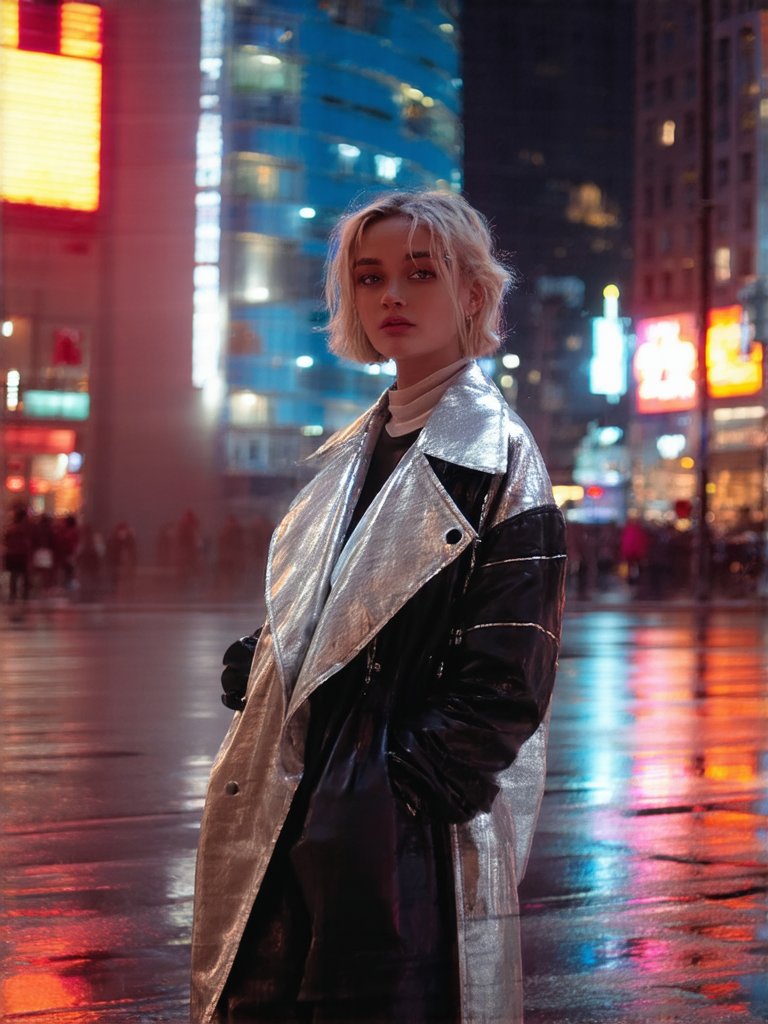
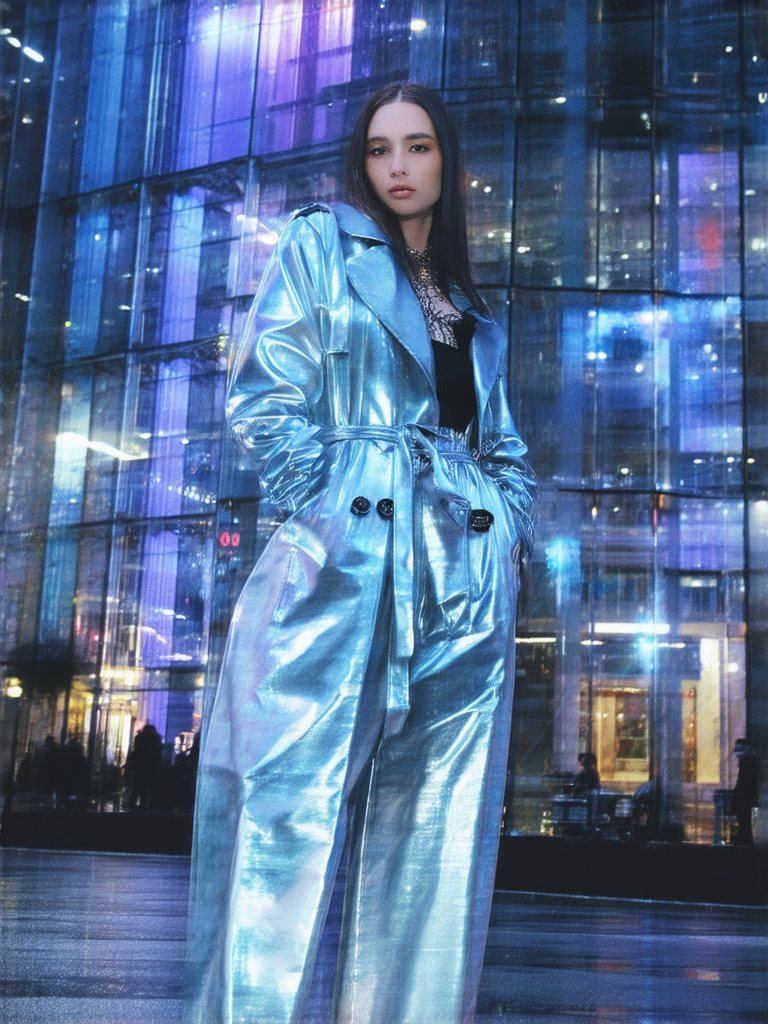
This example uses a futuristic fashion prompt designed to create an editorial-style portrait in a neon city setting. The two images below were generated with the same settings. Because randomness was enabled, the final compositions are different.
Prompt used
The user prompt focuses on the subject, outfit, setting, background, surface detail, pose, and mood. The Fashion style setting then adds the editorial photography direction automatically.
a stylish woman wearing a futuristic silver coat, standing on a neon-lit city street at night, glass buildings in the background, wet pavement reflections, confident pose, hands partially in coat pockets, elegant expression, modern urban atmosphere
Style setting
For this example, the Fashion style was selected. This adds a professional editorial fashion direction, including magazine-style photography, controlled lighting, shallow depth of field, and sharp focus.
Style: Fashion

Automatically added style direction:
editorial fashion photography, high-end fashion magazine, professional studio lighting, soft dramatic lighting, shallow depth of field, sharp focus
The user prompt does not need to repeat “fashion photography” or “studio lighting” because the selected style already supplies that direction. This keeps the main prompt focused on the subject and scene.
Generation settings
The image was created in a 3:4 aspect ratio. This format works well for fashion portraits because it gives enough vertical space for the person, outfit, and pose while still showing part of the city background.
| Aspect ratio | 3:4 |
|---|---|
| Resolution | Standard |
| Steps | 20 |
| Randomness | Random |
| Selected style | Fashion |
| User negative prompt | None |
No custom negative prompt was entered for this example. However, the selected Fashion style automatically applies negative guidance to reduce common fashion portrait issues such as overprocessed skin, harsh flash, blurry output, watermarks, or unwanted text.
Automatically applied Fashion negative guidance:
overprocessed skin, waxy skin, plastic skin, harsh flash, amateur, low quality, worst quality, blurry, watermark, text
Prompt breakdown
This prompt works because the user input and the selected style have separate roles. The user prompt describes the scene, while the Fashion style handles the editorial look.
“a stylish woman” tells the model the image should focus on a fashion portrait subject.
“wearing a futuristic silver coat” creates the strongest visual identity and gives the image a fashion-forward concept.
“standing on a neon-lit city street at night” places the subject in a modern urban environment.
“glass buildings in the background” adds architecture and helps make the scene feel more futuristic.
“wet pavement reflections” adds color, light, and depth to the lower part of the image.
“confident pose,” “hands partially in coat pockets,” and “elegant expression” guide the subject’s body language.
Why this prompt works
This prompt works because it gives the model a clear fashion concept without overloading the scene. The most important visual idea is the futuristic silver coat. The neon city and glass buildings support that idea, while the wet pavement reflections add atmosphere.
The prompt also avoids naming a specific brand, celebrity, magazine, or copyrighted character. Instead, it describes general visual qualities: futuristic clothing, urban night lighting, reflective pavement, and a confident fashion pose.
Why the hands are partially hidden
Hands and fingers can be difficult in AI-generated portraits. For this reason, the prompt uses the phrase “hands partially in coat pockets.” This keeps the pose natural while reducing the chance that the fingers become too prominent or visually distorted.
Pose phrase:
hands partially in coat pockets

Effect:
natural fashion pose, less focus on fingers, cleaner portrait composition
Why 3:4 works well here
A 3:4 aspect ratio is a good match for fashion portraits because it supports a vertical composition. It gives enough room for the coat, upper body, pose, and background while keeping the person as the main focus.
A square format would make the portrait feel more centered and cropped. A wide 16:9 format would show more city, but the outfit and pose might become less important. For this example, 3:4 keeps the balance between fashion and environment.
How randomness changes the result
Both sample images use the same prompt and settings, but they have different compositions. The first image feels closer and more street-focused, with warm red and orange reflections. The second image shows more of the outfit and uses cooler blue lighting with a stronger glass-building background.
This is useful when creating prompt examples. You can keep the same prompt structure and generate several variations, then choose the one that best matches the article or visual direction.
How the Fashion style changes the result
The Fashion style makes the result feel more like an editorial portrait than a casual street snapshot. Words like “high-end fashion magazine,” “professional studio lighting,” and “sharp focus” push the image toward a polished, magazine-inspired look.
Because the style setting already adds this direction, the user prompt can stay practical and specific. It only needs to describe who the subject is, what they are wearing, where they are, and what mood the image should have.
Prompt variations to try
Once the basic prompt works, you can create different fashion moods by changing the coat, city setting, lighting, or background architecture.
Luxury city version
a stylish woman wearing a futuristic white coat, standing in a modern city at night, soft neon reflections, glass architecture, calm confident pose, hands partially in coat pockets, elegant expression, luxury urban atmosphere
Darker city version
a stylish woman wearing a futuristic black coat, standing on a neon-lit city street at night, colorful signs, wet pavement reflections, confident pose, hands partially in coat pockets, elegant expression, modern urban atmosphere
Minimal metallic version
a stylish woman wearing a minimalist metallic coat, standing in front of glass buildings at dusk, soft city lights, clean modern architecture, confident pose, hands partially in coat pockets, elegant expression, luxury fashion atmosphere
Tips for writing similar prompts
For fashion portrait prompts, start with the subject and outfit. Then add a setting, background, lighting detail, pose, and mood. Keep the prompt clear, and let the style setting handle the broader fashion photography direction.
subject + outfit + setting + background + lighting or reflections + pose + expression + mood
This structure is especially useful when using a style preset. The prompt describes the content of the image, while the selected style controls the visual language.
Final thoughts
This example shows how a fashion-style image can be created without relying on any specific brand, celebrity, or copyrighted reference. The prompt uses general visual ideas: futuristic clothing, neon city lighting, glass buildings, wet reflections, and a confident pose.
The most important phrases are “futuristic silver coat,” “neon-lit city street at night,” “wet pavement reflections,” and “hands partially in coat pockets.” Together with the Fashion style setting, they create a polished futuristic fashion portrait that is easy to understand and easy to vary.